National Geographic Photo of the Day

Showing posts with label Playstation 3. Show all posts

Tuesday, August 18, 2009

The Slim is In


A few minutes ago, Sony's announcement at Gamescom 09 has stolen the thunder from the Xbox 360.

A new slimmer, lighter PS3 was unveiled at the event by Kaz Hirai. The new console will retail for 299 dollars and 299 euros. I don't know what the pricing in India will be yet. Still, all PS3s on shelves will have their prices drop too - that means the current "fat" PS3 will soon sell at $299.

The slim consumes less power, weighs less and occupies less space. It has a 120gb hard drive inside and features are reportedly identical to the current SKUs of the console.


The fat iteration of the console still, in my opinion, has the better looks than the slim with its matte finish and PS2-esque lettering.

Either way this is good news for gamers. Rejoice ye all, for Sony hath finally seen the light!

Sunday, August 16, 2009

Tips for a PS3 Noob

When I first got a PS3, there were a few things I wanted to check out on it but 'twas a while before I got a hang of it. Perhaps listing those things out here will help someone who has just bought the black beauty.


  • Checking HDD space

No, you cannot browse the PS3's hard drive like you would on MS Windows' explorer. Here everything is grouped according to the type of data - Music, Video, Photos etc.

So if you want to do a quick check on how much space you have left just head over to Settings --> System Settings ---> System Information.

And the hard drive on any PS3 can be replaced with a regular 2.5 inch (laptop) SATA hard drive at 5400rpm, if you wish to upgrade it that is.

  • Playing Media from a USB Drive

I initially tried plugging in a 16gb pen drive with videos on it and the PS3 wouldn't detect it. I thought "Maybe the pen drive ain't so good". Later I found that the PS3 can handle only FAT32 formatted devices. So format every drive you intend to use with the PS3 as FAT32. This will also limit file sizes to 4gb.

Furthermore unless you put video files in a VIDEO folder, or music under a MUSIC folder on the drive, the console won't show you the files directly. What you have to do (as an example I'll use divx files under the root directory) is go to the video section, scroll down to your drive, then press triangle and choose "Display all". This will show you all the compatible files that you can open.

The same procedure is applicable for opening music or photos.

And you would do well to use a USB 2.0 drive if you want to play HD videos off it.


  • Copying files

You might notice that while downloading from the PSN store you'll be able to allow a download to go on in the background. This cannot be done while you copy data between the PS3's hard disk and an external disk. Once you set it to copy a file, it will not let you do any other operation until either the files have been copied or the operation has been canceled. Background downloads will still continue while you're copying though.


  • Changing OS

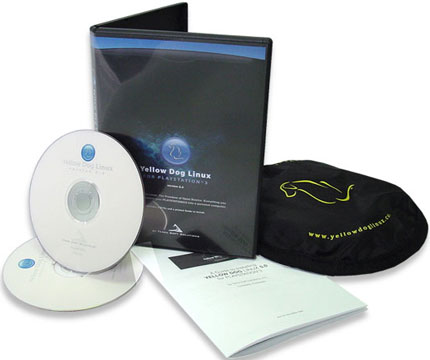
You can install Linux on your PS3, a quick google search will get you all the info you need. But note one important point before you even consider changing your OS to Linux --- You will lose all your data (apart from what you've backed up) and you'll have to download add-ons and updates for games, game demos etc. all over again.


  • Changing between TVs

Look at this scenario. You've got the PS3 connected to a HDTV (an LCD or Plasma) via HDMI. One fine day you take it along with you on a trip and try connecting it to a Standard Definition TV which has composite inputs. What you'll get is a blank screen even after powering on the PS3 and you'll be clueless as to the solution.

This is pretty simple to set right. From standby mode (that is with the red light on) just hold the power button 4-5 seconds until you hear the second beep. Then release the power button and the console will switch itself on and reset its video and audio output settings. This way you can set your PS3 up to work with the new television. Don't worry this won't damage your PS3 in any way or reset any other settings or saves.


  • Audio output - 2.0, 5.1, 7.1

The PS3 can only output 2.0 audio from the composite out port. The optical audio output will again only support 5.1 audio out, whereas 7.1 will be available only when you use a hyper-expensive receiver which supports HDMI audio input and can pass the HDMI video out without doing anything to it.

Now there'll be people saying "So what, 5.1 is good enough for me, I can get DTS-HD or Dolby TrueHD tracks in 5.1 from a Bluray via my optical input-equipped speakers!". Wrong.


LPCM 5.1 or DTS-HD or Dolby TrueHD has too much data to be sent via an optical cable. The only tracks you'll end up getting via optical out will be normal DD 5.1 or DTS, in other words DVD-Quality surround audio.

Here's a complete audio compatibility chart. The source of this chart is edepot.com:

PS3 CompatiblityBitstream (HDMI)LPCM (HDMI)Bitstream (TOSLINK)LPCM (TOSLINK)AV Multi
Linear PCM 7.1YesYesNoNoYes (Stereo)
Dolby TrueHD 7.1NoYesNoYes (Stereo 44.1kHz)Yes (Stereo)
Dolby TrueHD 5.1NoYesNoYes (Stereo 44.1kHz)Yes (Stereo)
Dolby Digital PlusYesYesYesYes (Stereo)Yes (Stereo)
Dolby DigitalYesYesYesYes (Stereo)Yes (Stereo)
dts-HD MA (7.1)NoYes (5.1)NoYes (Stereo)Yes (Stereo)
dts-HD HRA (7.1)NoYesNoYes (Stereo)Yes (Stereo)
dts Digital SurroundYesYesYesYes (Stereo)Yes (Stereo)
SA-CD 5.1NoYes (176kHz)NoYes (Stereo 44.1kHz)Yes (Stereo)
SA-CD StereoNoYes (176kHz)Yes (Stereo 44.1kHz)Yes (Stereo 44.1kHz)Yes (176kHz)


If you're wondering what TOSLINK is, its nothing but Optical.

Saturday, July 25, 2009

Guide: Getting a WMV-HD video ready for the PS3


In my last post, I’d detailed how you could demux and remux a video from an MKV container into a PS3-compatible format.


This time around I’ll be describing the same operation but with the input file being a high definition WMV having a VC-1 codec video and WMA Pro Audio. Inevitably most such HD WMV movies come with a 5.1 WMA Pro audio track and a 2.0 WMA track as well. The sad thing is that the console will NOT read the WMA Pro 5.1.


Applications Required:

  • Windows Media Encoder (freely downloadable from Microsoft)
  • Boilsoft Video Splitter (this one isn’t a free utility, so use it or some other free tool capable of splitting WMV-HD. If you do find a free alternative, please tell me via the comments)

What we’re gonna do here is basically create a WMV-file with the VC-1 video and ONLY the 2.0 audio track.


First download and install Windows Media Encoder. A quick google search will get you the link.


Once Windows Media Encoder is installed, you’ll see there’s “Windows Media Stream Editor” under Start--> Windows Media --> Utilities. Click on that. Now go to Add Source, and choose your WMV file. Once ‘added’ to the input list, expand all the + boxes until you have something similar to the following picture.


Now, you’ll see two “audiences” (or more if you have more audio tracks) and each one will have a video and audio subcategory underneath which will further expand to reveal the bitrates and the language. Leave all the checkboxes unchecked initially. The audio track that says 384 kbps will most likely be the 5.1 audio. The video tracks will always be in the mbps bitrate range. So check the box next to the other audio track (probably 192kbps or 333 kbps), and check the box to the video track under the same audience as the audio track you just selected.


Click “Add” and the audience you selected should appear under output audiences. Next click “create file” and give the output a name. Hit “Start” and your output should be ready soon. The video from these files will play well in VLC, but then the audio might return an error. There’s no need to be alarmed, just continue.


This file should be playable on a PS3 as such, but there exists a problem when the file is larger than 4gb. As explained earlier, only files smaller than the above stated size can fit on FAT formatted media. Anything more will need NTFS, which again is not supported by the PS3. So you’ll need to split the file.


Whereas tsMuxer has an inbuilt “Split option”, that is absent in Windows Media Encoder. So we need to use Boilsoft Video Splitter to do that task. Open up Boilsoft Video Splitter, and click Open and load your newly created WMV. Use the split into option and type in the number of pieces you want. Once the size of each part is below 4gb, click the split button, and it should give you two WMV files (or how many ever parts you chose).


Finally, copy them over to the PS3 and enjoy your HD WMV videos.


Friday, July 24, 2009

Guide: Demuxing and Remuxing MKV for the PS3

I had purchased a 160gb PS3 a month back, not just for gaming, but for its media-related features as well. Though I do stream (via wifi or ethernet) a bit to the Playstation 3, I tend to load its hard drive with High Definition (720p and 1080p) videos which, initially, were in MKV and WMV-HD formats.


Now the PS3 will not play files in the MKV Container as is. So don't try putting them directly on the HDD. I'd like to share my experience with muxing and demuxing these files and WMVs for the benefit of others in the similar situation.

First, MKVs.

As an example, I will be using an MKV with x264 video and DTS 5.1 audio. Transcoding to a different codec might make this file more compatible with the PS3, but the problem is any sort of transcoding operation WILL decrease video quality. So all we're aiming to do is demux and remux, and convert the audio alone. And I'm not going to deal with subtitles either.
Applications required:
  • MKVToolnix (MKV-extract GUI in particular)
  • WinFF
  • TsMuxer GUI


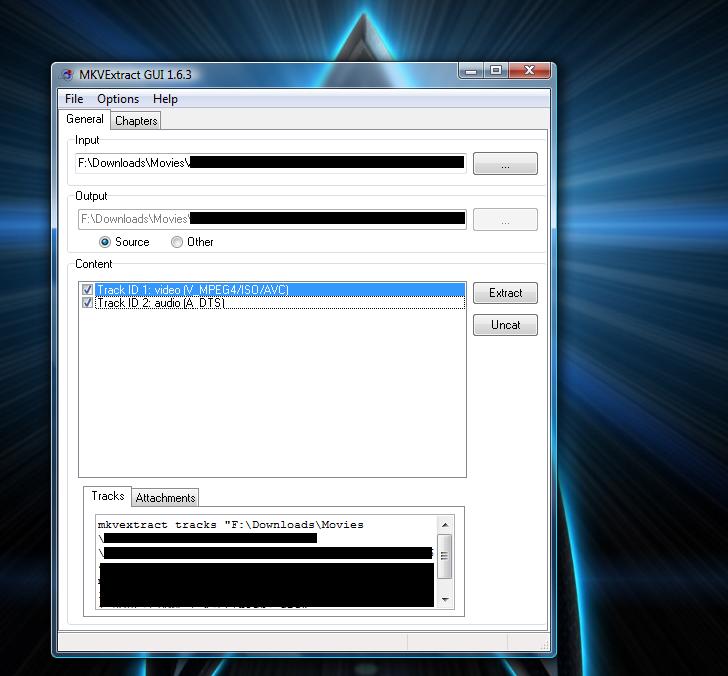
Load up your MKV file in MKV Extract GUI. The list of tracks contained in the MKV is displayed. Here select just the MPEG4/ISO/AVC and DTS tracks (check the boxes) and hit extract. The destination directory will contain the output in the form of a .264 and .dts file. The .dts file is the audio portion and I downmix that to 2.0 AC3 using WinFF. Open up WinFF and drag and drop the .dts file into it. Select Audio from the drop down menu and AC3 384kbps from the subcategory. The end result after you convert this will be a .ac3 file.

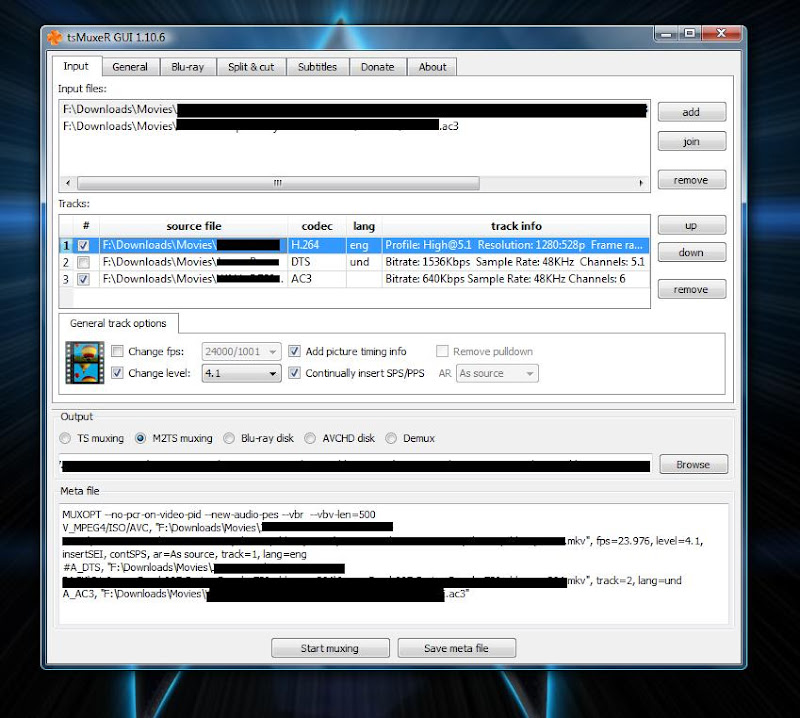
We now have all we need to make the m2ts output that will play on the PS3. Start up TsMuxer GUI. Drag and drop both the AC3 and the X264 parts into TsMuxer. There is one alternative way to do this too, without extracting the video (x264) from the mkv. TsMuxer can directly read the MKV and it will list the DTS track as well as the video track. Leave the video selected, uncheck the DTS audio and add the AC3 audio to the list of inputs. Check the box next to the AC3 track too.


Click on the track that says H.264. If the number next to "Change level" is greater than 4.1, enable the option "Change level" and choose 4.1 from the drop down menu. Else it won't play on the console. Choose "M2TS muxing" as the output option. Also, if your video is greater than 4gb, you won't be able to put it on a FAT32 formatted drive (whether it be a pen drive or an external HDD). And the PS3 cannot read NTFS formatted media.

So use the split and cut tab to choose the "Split by size" option and enter a value less than 4gb. Then go back to the Input tab and hit start muxing. Your output file will be a .m2ts file (or two or three of them if you had a large video to begin with). Copy these to the FAT32 formatted media, and enjoy HD awesomeness on your LCD or Plasma via the black box (assuming you have a HD ready or Full HD screen that is).

I'll post on how to rectify the WMV-HD video for playback on the PS3 in another post.

Till then, I hope this helps. And do note that the tools mentioned are all freely downloadable.


UPDATE: Please note that I'm downmixing 5.1 DTS to AC3 2.0 in the above example. However if you wish to convert the DTS 5.1 to AC3 5.1, just Popcorn MKV AudioConverter (links to tutorial and download), its a free utility. Then use the converted AC3 5.1 audio equipped MKV directly in TsMuxer.

The reason I'm not directly using 5.1 DTS is because the latest version of TsMuxer gives me an output with only video when I use the MKV directly with DTS. Might just be some problem with my computer and TsMuxer not getting along well but thought I'd suggest an alternate.

Monday, June 1, 2009

Slim PS3 Confirmed?? - So it seems

With E3 - the gaming industry's Mecca - approaching, the rumour mills are spinning at full throttle.

Sony have always gone on to introduce new and slimmer versions of the playstation - the PS1 led to the PSOne, the PS2 wound up as slimmer PSTwo.

For days now there's been a great deal of speculation about the PSP Go (image on the left) and a new lighter, redesigned Playstation 3 from Sony, what with there being leaked photos and videos of both devices put up on various websites, and take-down notices flying left right and center (when box pictures purportedly of the new PS3 were leaked) . The PSP Go was indeed confirmed whereas the new slimmer PS3 was in the realm of hopeful speculation.

Until now.....

I just saw this bit on the BBC News website yesterday afternoon (the 1st of June, 2009) on an article about the PSP Go being confirmed.

Quoted from BBC News:
"There have also been reports that Sony will announce a re-designed, slimmer PlayStation 3 but BBC News understands this will not be launched at E3.

The new PS3 model will be out later this year, BBC News understands. "

The current versions of the PS3 are sexy enough (image right) as they are, both in terms of looks and the powerful hardware within that shell. But a new iteration could bring in newer features, the mythical never too-soon price cut and who knows what else!!!

So I guess it is confirmed but not at E3, 2009. With a new model coming out later this year, Sony might look to clear the shelves of the older model at a quick pace. This might mean that existing machines will attract some discounts either much before or immediately after the release. In all probability, the PS3 "Slim", as many have become fond of calling it, is set to make its debut during the holiday season (around Christmas) towards the end of the year. Lets hope so at least.

I don't think the BBC would open their mouth unless its true and they've got a reliable source.

Here's an artist's rendering (from T3 Magazine) of a possible design for the new PS3 "Slim".


PS: Here's the link to the BBC Article - http://news.bbc.co.uk/2/hi/technology/8076573.stm